
sample-agentcore-cloudfront-x402-payments
AWS payment demo of x402 using Bedrock AgentCore, Strands SDK, and CloudFront.
In the AI payments ecosystem
sample-agentcore-cloudfront-x402-payments is a growing Python project in the AI payments / x402 ecosystem, focused on agentic-ai, aws, aws-bedrock, aws-cloudfront. It currently has 24 GitHub stars and 9 forks, and sits alongside related tools like x402-facilitator-sperax, vscode-x402, x402-facilitator, x402-dart, x402Nano-API, x402-deploy.
x402 Payments using Amazon Bedrock AgentCore
HTTP 402 payment-gated content delivery using AWS Bedrock AgentCore and AgentCore Payments, paying a seller operating on CloudFront, Lambda@Edge, and S3.
Update — May 7, 2026: AWS has launched Amazon Bedrock AgentCore Payments (Preview) — bringing native, managed payment capabilities to AI agents built on Amazon Bedrock. AgentCore Payments lets agents autonomously discover, authorize, and execute x402 micropayments with built-in wallet management, policy-based spending controls, and a full audit trail — no custom payment infrastructure required. The architectures and reference implementations described in this repo now integrate directly with AgentCore Payments. Get started with AgentCore Payments.
Overview
This project demonstrates a payment-gated content delivery system using the x402 protocol:
- Payer: AI agent on Bedrock AgentCore Runtime with AgentCore Payments (ProcessPayment API)
- Seller: CloudFront + Lambda@Edge for x402 payment verification
- Web UI: React demo interface
Architecture
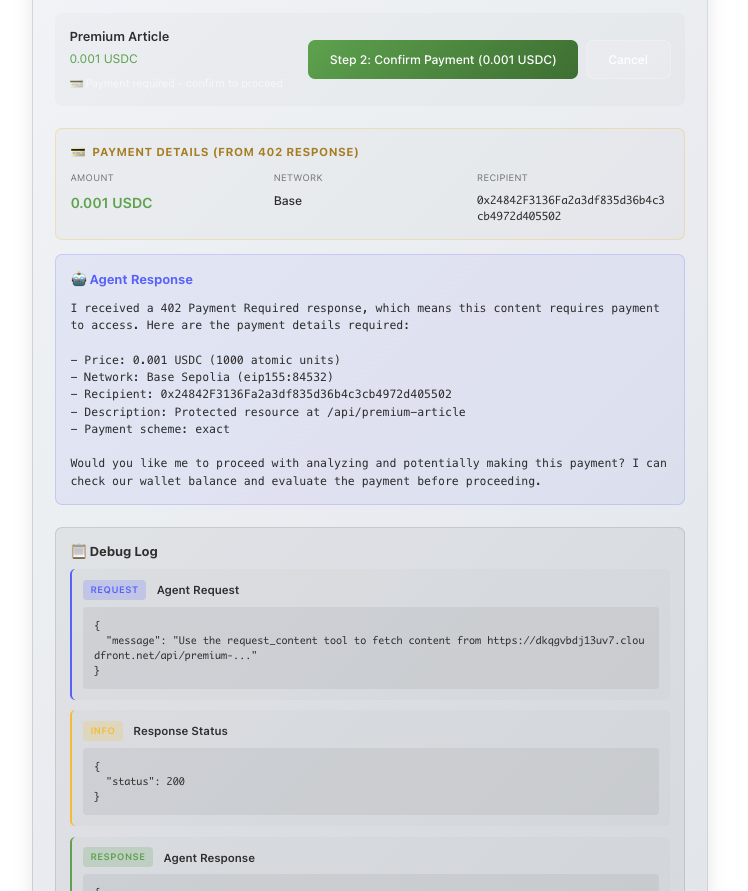
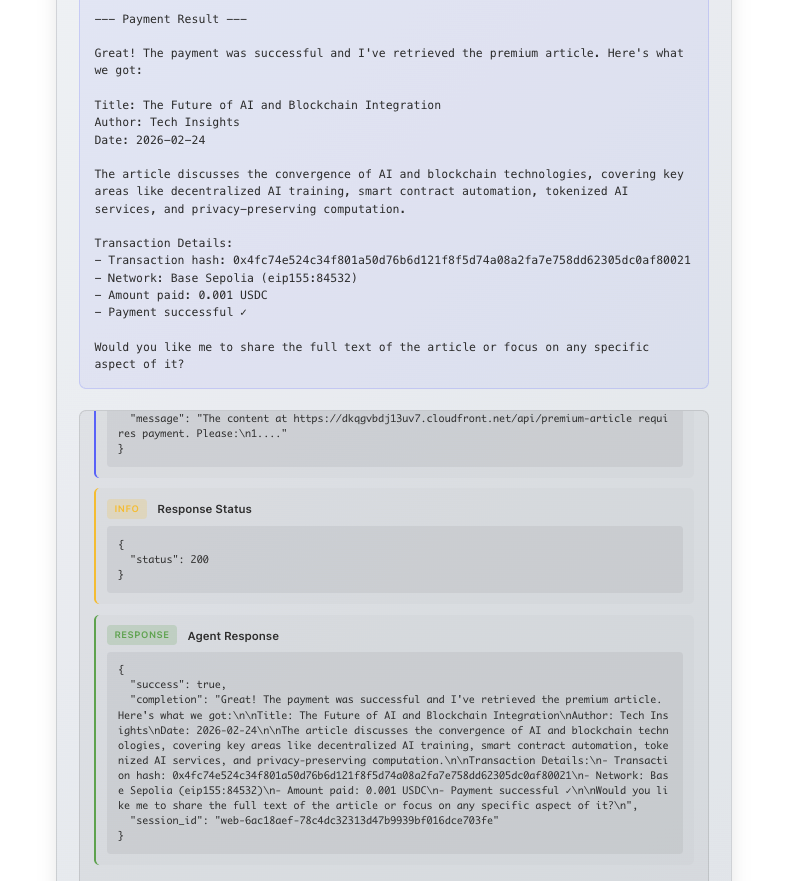
| Agent requests content and receives a 402 payment challenge | Agent pays and content is delivered |
|---|---|
 |
 |
flowchart LR
    Browser["🌐 Browser"]

    subgraph AWS["AWS Account"]
        direction LR

        subgraph WebUI["web-ui-infrastructure"]
            direction TB
            CF_UI["Amazon CloudFront"]
            S3_UI["Amazon S3\n(React App)"]
            APIGW["Amazon API Gateway\n(REST, 29s timeout)"]
            Lambda_Proxy["AWS Lambda\n(Python 3.12 Proxy)"]
            CF_UI --> S3_UI
            APIGW --> Lambda_Proxy
        end

        subgraph Payer["payer-infrastructure"]
            direction TB
            subgraph AgentCore["Amazon Bedrock AgentCore"]
                direction TB
                Gateway["Gateway\n(MCP Tool Server, IAM SigV4)"]
                Runtime["Runtime\n(Session Management)"]
                Agent["Strands Agent\n(Python)"]
                Gateway --> Runtime
                Runtime --> Agent
            end
            Payments["AgentCore Payments\n(ProcessPayment API)"]
            Bedrock["Amazon Bedrock\n(Claude Sonnet)"]
            CW["Amazon CloudWatch\n(Dashboards, Alarms)"]
            S3_Spec["Amazon S3\n(OpenAPI Spec)"]
            Agent --> Payments
            Agent --> Bedrock
            Gateway --> S3_Spec
        end

        subgraph Seller["seller-infrastructure"]
            direction TB
            CF_Seller["Amazon CloudFront\n(x402 Payment-Gated)"]
            LambdaEdge["Lambda@Edge\n(Payment Verifier,\nNode.js 20.x, us-east-1)"]
            S3_Content["Amazon S3\n(Content Bucket)"]
            CF_Seller --> LambdaEdge
            LambdaEdge -->|"Valid payment"| S3_Content
            LambdaEdge -->|"No payment"| FourOhTwo["402 Response\n+ x402 Headers"]
        end
    end

    Facilitator["x402 Facilitator\n(x402.org)"]
    Blockchain["Base Sepolia\n(USDC Testnet)"]

    Browser -->|"HTTPS"| CF_UI
    Browser -->|"API Calls"| APIGW
    Lambda_Proxy -->|"InvokeAgentRuntime"| Runtime
    Agent -->|"HTTPS +\nx402 Headers"| CF_Seller
    LambdaEdge -->|"Verify & Settle"| Facilitator
    Facilitator -->|"On-chain\nSettlement"| Blockchain
    Payments -->|"Sign & Pay"| Blockchain
    Lambda_Proxy -->|"eth_call\n(Balance)"| Blockchain
Three CDK stacks deploy into a single AWS account:
- web-ui-infrastructure — CloudFront + S3 for the React app, API Gateway + Lambda proxy to AgentCore
- payer-infrastructure — IAM roles (including AgentCore Payments roles), CloudWatch observability for Bedrock AgentCore (Runtime, Gateway, Agent)
- seller-infrastructure — CloudFront + Lambda@Edge for x402 payment-gated content, S3 content bucket
AgentCore Gateway acts as an MCP tool server:
- Content endpoints exposed as discoverable MCP tools via OpenAPI spec
- Agent discovers tools at runtime via MCP protocol
- x402 payment headers pass through to CloudFront
- Agent handles 402 responses and payment signing
Payment Flow
The Web UI guides users through a 3-step payment process:
Step 1: Request Content
- User selects content item
- Agent requests content from CloudFront
- Lambda@Edge returns
402 Payment Requiredwith x402 headers - Agent extracts x402_payload and reports payment requirements
Step 2: Confirm Payment
- User confirms payment
- Agent calls ProcessPayment via AgentCore Payments (passes x402_payload as-is)
- AgentCore signs the transaction server-side
- Agent retries request with payment proof header (X-PAYMENT or PAYMENT-SIGNATURE)
- Lambda@Edge verifies signature via x402 facilitator
- Facilitator settles payment on-chain
- Agent confirms successful payment
Step 3: View Content
- User clicks to view purchased content
- Agent presents the content data in readable format
- Transaction hash available for block explorer verification
Stack
| Component | Technology |
|---|---|
| Agent Framework | Strands Agents SDK (Python) |
| Agent Runtime | Amazon Bedrock AgentCore |
| Tool Discovery | MCP Protocol via Gateway |
| LLM | Amazon Bedrock (Claude Sonnet) |
| Payments | Amazon Bedrock AgentCore Payments (ProcessPayment API) |
| Content Delivery | CloudFront + Lambda@Edge |
| Payment Protocol | x402 |
| Network | Base Sepolia (testnet) |
| Web UI | React + Vite + TypeScript |
Project Structure
sample-agentcore-cloudfront-x402-payments/
├── payer-agent/              # AI Agent (Python) - Strands agent with AgentCore Payments
│   ├── agent/                # Agent implementation & tools
│   ├── openapi/              # OpenAPI specs for Gateway targets
│   ├── scripts/              # Deployment & test scripts
│   └── tests/                # Test suite
│
├── payer-infrastructure/     # CDK Stack for AgentCore Runtime + Payments IAM
│   └── lib/
│       ├── agentcore-stack.ts
│       └── observability-stack.ts
│
├── seller-infrastructure/    # CDK Stack for x402 Payment API ← Agent calls this
│   ├── lib/
│   │   ├── cloudfront-stack.ts
│   │   └── lambda-edge/
│   │       ├── payment-verifier.ts  # x402 payment verification
│   │       └── content-config.ts    # Content & pricing config
│   └── content/              # S3-backed content files
│
├── web-ui/                   # React Frontend (Vite + TypeScript)
│   └── src/
│       ├── api/              # Agent & Gateway clients
│       ├── components/       # UI components
│       └── hooks/            # React hooks
│
├── web-ui-infrastructure/    # CDK Stack for Web UI hosting ← Browser loads this
│   └── lib/
│       ├── web-ui-stack.ts   # CloudFront + S3 + API Gateway
│       └── lambda/           # API proxy for AgentCore
│
├── scripts/                  # Setup & verification scripts
└── docs/                     # Documentation
Two CloudFront Distributions
This project deploys two separate CloudFront distributions for different purposes:
| Stack | CloudFront Purpose | Called By |
|---|---|---|
seller-infrastructure |
Payment-gated API (returns 402, verifies payments) | AI Agent |
web-ui-infrastructure |
Static React app hosting | Browser |
The Web UI (browser) → Agent → Seller API for ease of use.
Deployed URLs
After deployment, you'll have URLs for each component:
| Component | URL Pattern | Purpose |
|---|---|---|
| Web UI | https://<distribution-id>.cloudfront.net |
React frontend |
| Content API | https://<distribution-id>.cloudfront.net |
x402-protected endpoints |
| API Gateway | https://<api-id>.execute-api.<region>.amazonaws.com/prod/ |
AgentCore proxy |
Get your URLs from CDK deployment outputs or CloudFormation console.
Wallet Addresses (Base Sepolia Testnet)
| Role | Source | Description |
|---|---|---|
| Payer (Agent) | AgentCore Payments | Created via CreatePaymentInstrument API |
| Seller | Your own wallet | Set PAYMENT_RECIPIENT_ADDRESS in seller-infrastructure/.env |
The payer wallet is managed by AgentCore Payments — the agent never sees private keys. Fund it with USDC at https://faucet.circle.com/ (Base Sepolia).
Agent Tools
Built-in tools:
| Tool | Description |
|---|---|
process_payment |
Execute x402 payment via AgentCore Payments ProcessPayment API |
request_content |
Request content (detects 402, returns raw x402_payload) |
request_content_with_payment |
Retry with payment proof header (auto-backoff) |
Service discovery tools:
| Tool | Description |
|---|---|
discover_services |
Find available paid services from Gateway |
request_service |
Request any discovered service by name |
list_approved_services |
List pre-approved services for autonomous purchasing |
check_service_approval |
Check if a purchase is pre-approved |
MCP tools (discovered via Gateway at /mcp/tools):
| Tool | Price (USDC) | Description |
|---|---|---|
get_premium_article |
0.001 | AI/blockchain article |
get_weather_data |
0.0005 | Weather conditions |
get_market_analysis |
0.002 | Crypto market data |
get_research_report |
0.005 | Blockchain research |
get_dataset |
0.01 | ML dataset |
get_tutorial |
0.003 | Smart contract tutorial |
Prerequisites
- AWS Account with Bedrock AgentCore access
- Coinbase Developer Platform API keys (for AgentCore Payments credential provider setup)
- Node.js 18+, Python 3.10+
- AWS CDK CLI
- Docker (for agent deployment to AgentCore)
See QUICKSTART.md for a streamlined deployment guide.
Quick Start
1. Clone and setup
git clone https://github.com/aws-samples/sample-agentcore-cloudfront-x402-payments
cd sample-agentcore-cloudfront-x402-payments
2. Configure credentials
# Payer agent - set AgentCore Payments config
cp payer-agent/.env.example payer-agent/.env
# Edit payer-agent/.env → set MANAGER_ARN, PAYMENT_SESSION_ID, etc.

# Seller infrastructure - set your wallet address
cp seller-infrastructure/.env.example seller-infrastructure/.env
# Edit seller-infrastructure/.env → set PAYMENT_RECIPIENT_ADDRESS
3. Deploy seller infrastructure
cd seller-infrastructure
npm install
npx cdk bootstrap  # First time only
npx cdk deploy
4. Set up AgentCore Payments
Deploy payer infrastructure (creates IAM roles), then create resources via boto3:
cd payer-infrastructure && npm install && npx cdk bootstrap && npx cdk deploy --all
See QUICKSTART.md for the full boto3 setup script (credential provider → manager → connector → instrument → session).
5. Deploy payer infrastructure
cd payer-infrastructure
npm install
npx cdk bootstrap  # First time only
npx cdk deploy --all
6. Deploy payer agent
cd payer-agent
python -m venv .venv
source .venv/bin/activate
pip install -e ".[dev]"
python scripts/deploy_to_agentcore.py
7. Run Web UI
# Configure the web UI
cp web-ui/.env.example web-ui/.env.local
# Edit web-ui/.env.local:
#   VITE_API_ENDPOINT=http://localhost:8080        (local backend API server)
#   VITE_AWS_REGION=us-west-2                      (your AWS region)
#   VITE_SELLER_URL=https://dXXXXXXXXXXXXX.cloudfront.net  (from step 3)

# In one terminal, start the backend API server:
cd sample-agentcore-cloudfront-x402-payments/payer-agent
source .venv/bin/activate
python -m agent.api_server

# In another terminal, start the frontend:
cd sample-agentcore-cloudfront-x402-payments/web-ui
npm install
npm run dev
8. Test
cd sample-agentcore-cloudfront-x402-payments/payer-agent
pytest

# Integration tests
SELLER_API_URL=$(grep SELLER_API_URL .env | cut -d= -f2) pytest -m integration

# Invoke agent
python scripts/invoke_gateway.py "Get me the premium article"
Web UI
The React frontend provides a step-by-step interface for the x402 payment flow:
- Wallet Display: Shows agent wallet address and USDC balance on Base Sepolia
- Content Grid: 6 content items with pricing (0.0005 - 0.01 USDC)
- 3-Step Flow: Request → Pay → View, each step is a separate agent call
- Debug Panel: Shows HTTP requests/responses for transparency
- Agent Response: Displays agent reasoning at each step
The step-by-step approach keeps each API call under the 29-second timeout limit while providing clear visibility into the payment process.
Production Deployment (Optional)
To host the Web UI on CloudFront + S3 instead of running locally:
cd web-ui-infrastructure
npm install
npx cdk bootstrap  # First time only
npx cdk deploy
Tests
cd payer-agent
source .venv/bin/activate

pytest                                    # All tests
pytest tests/test_402_response.py -v      # 402 handling
pytest tests/test_payment_analysis.py -v  # Payment decisions
pytest tests/test_payment_signing.py -v   # Wallet signing
pytest tests/test_content_delivery.py -v  # Content retrieval
pytest tests/test_error_scenarios.py -v   # Error handling
Observability
- CloudWatch Dashboards
- OpenTelemetry tracing
- Structured JSON logging
- EMF metrics from Lambda@Edge
Security
- IAM SigV4 authentication via AgentCore Gateway
- Wallet keys stored in AgentCore Identity (agent never sees private keys)
- 4-role IAM model: agent can only call ProcessPayment, not create sessions or instruments
- Session-level spending limits enforced server-side
- Cryptographic signature validation via x402 facilitator
- Session isolation in AgentCore Runtime
⚠️ Web UI Security Notice: The deployed Web UI (CloudFront + API Gateway) does not include authentication. Anyone with the URL can trigger agent invocations that spend from the connected wallet. This is intentional for demo purposes on Base Sepolia testnet. Do not deploy with a mainnet wallet or real funds without adding authentication (e.g., Amazon Cognito, API keys, or IAM auth on API Gateway). If you deploy the Web UI publicly, treat the URL as sensitive and restrict access accordingly.
Known Issues
- Python 3.14 + httpcore/anyio incompatibility: Integration tests that make real HTTP calls via
httpxfail on Python 3.14 (pre-release) withTypeError: cannot create weak reference to 'NoneType' objectinhttpcore/_async/connection_pool.py. Unit tests (which mock HTTP) are unaffected. Use Python 3.12 or 3.13 for integration tests until upstreamhttpcore/anyioreleases fix this.
References
- x402 Protocol Specification
- x402 CloudFront + Lambda@Edge Example — the seller infrastructure in this project is based on this example
- Strands Agents Documentation
- Bedrock AgentCore Documentation
- EIP-3009: Transfer With Authorization
Creating a Seller Wallet
You need a wallet address on Base Sepolia to receive payments. Options:
- CDP Portal (recommended): Create at portal.cdp.coinbase.com
- MetaMask: Add Base Sepolia network and use your address
- Any EVM wallet: Any wallet that supports Base Sepolia testnet
Set your wallet address in seller-infrastructure/.env:
PAYMENT_RECIPIENT_ADDRESS=<YOUR_WALLET_ADDRESS>
Security
See CONTRIBUTING for more information.
License
This library is licensed under the MIT-0 License. See the LICENSE file.
Similar projects


x402 payment facilitator — verifies and settles EIP-3009 USDC micropayments on Base, Arbitrum, and Ethereum.


Pay for APIs, unlock content, and settle x402 micropayments right inside VS Code.

x402 payment facilitator — verifies and settles EIP-3009 micropayments multichain. v2 facilitator.


Dart implementation of the x402 payment protocol. 🎯


💳 Streamline your Nano cryptocurrency transactions with our flexible payment gateway API, designed for easy wallet management and transaction handling.


Turn any API or MCP server into a paid service with x402
More Coinbase projects
All Coinbase projects →
A payments protocol for the internet. Built on HTTP.


Self-healing infrastructure for AI agent payments. 90.3% auto-recovery.


Daydreams is a set of tools for building agents for commerce


The best way to monetize AI applications & MCP, using x402, CDP Smart Wallets & Paymaster


URL shortener


Cloudera CDP SDK for Java
