x402 with Next.js
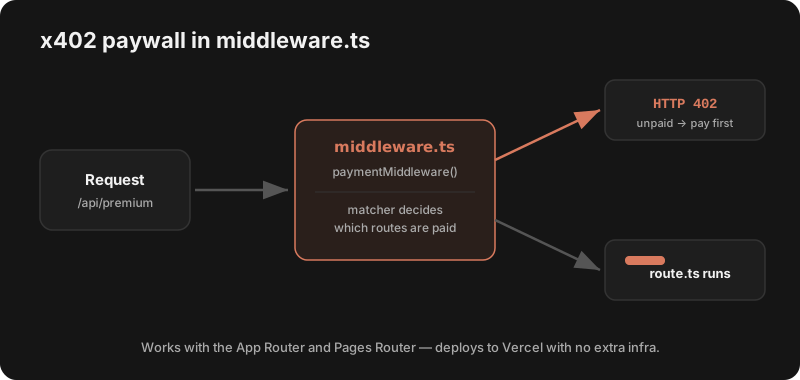
Add an x402 paywall to any Next.js route with one middleware.ts file. Works with the App Router and Pages Router, deploys to Vercel, and needs no backend private key.
1. Install
npm install @x402/next2. Configure middleware.ts
This is the whole paywall. The matcher decides which routes are gated — get this wrong and the route stays free (the #1 gotcha).
// middleware.ts  (project root, App Router or Pages)
import { paymentMiddleware } from "@x402/next";

export const middleware = paymentMiddleware(
  "0xYourReceivingWalletAddress",
  {
    // Charge per route. Keys are matched against the request path.
    "/api/premium": {
      price: "$0.01",
      network: "base-sepolia",  // use "base" in production
    },
  },
  { url: "https://x402.org/facilitator" }
);

// Only run the middleware on the paid routes
export const config = {
  matcher: ["/api/premium/:path*"],
};
3. Your route stays normal
You don't change your handler — it just runs only after payment. Returns HTTP 402 until then.
// app/api/premium/route.ts  (App Router)
export async function GET() {
  // Reaches here ONLY after a valid USDC payment
  return Response.json({ secret: "premium data", ts: Date.now() });
}
4. Call it (the client pays)
// Any client/agent that pays automatically
import { wrapFetchWithPayment } from "@x402/fetch";
// ...create a viem wallet client on baseSepolia...
const fetchWithPay = wrapFetchWithPayment(fetch, wallet);

const res = await fetchWithPay("https://your-app.vercel.app/api/premium");
console.log(await res.json());
Deploy to Vercel
Next.js middleware runs on Vercel's edge, so an x402 paywall ships with a normal deploy — no extra infra. For production, set network: "base" and a real receiving wallet. New to x402? Start with the step-by-step tutorial or browse starter kits.
Frequently asked questions
How do I add x402 to a Next.js app?
Install @x402/next, create a middleware.ts at your project root, and call paymentMiddleware with your receiving wallet address, a map of paid routes (each with a price and network), and a facilitator URL. Add a matcher config so the middleware only runs on the paid routes. Unpaid requests get HTTP 402; paid ones pass through to your route handler. Full code is on this page.
Does x402 work with the Next.js App Router and Pages Router?
Yes. The payment logic lives in middleware.ts, which runs the same way for both the App Router (app/) and the Pages Router (pages/). Your actual API handler — app/api/.../route.ts or pages/api/... — only executes after payment, so you don’t change your handler code, just add the middleware.
How do I test x402 in Next.js locally?
Set the route’s network to base-sepolia and fund a test wallet from a free USDC faucet. Run next dev, hit the protected route with no payment to see the 402, then use an x402-aware client (e.g. @x402/fetch) to pay and get a 200. Switch network to base when deploying to production.
Can I deploy an x402 Next.js app to Vercel?
Yes. Next.js middleware runs on Vercel’s edge, so an x402 paywall deploys with a normal Vercel deployment — no extra infrastructure. Use a hosted facilitator (e.g. Coinbase CDP) so settlement is handled for you. Just make sure the production route uses network "base" and a real receiving wallet.
Why is my Next.js x402 middleware not triggering?
The most common cause is the matcher config — if the request path isn’t in matcher, the middleware never runs and the route is free. Make sure the matcher pattern covers your paid routes and that the route keys in paymentMiddleware match the actual request paths. Also confirm the middleware.ts file is at the project root (or src/), not inside app/.
Do I need a backend wallet/private key in Next.js?
No. The server only needs a receiving wallet address. The payer holds the private key. This keeps your Next.js deployment safe — no signing keys in environment variables, just an address to receive USDC.
See also: SDKs for other frameworks · full tutorial · facilitators