
AP2_demo_app
AP2 Protocol (Agent Payments Protocol) implementation with microservices architecture. Built with FastAPI, Docker Compose, Next.js, LangGraph, MCP, Meilisearch, Redis, WebAuthn, A2UI, and OpenTelemetry.
In the AI payments ecosystem
AP2_demo_app is an early-stage Python project in the AI payments / x402 ecosystem, focused on a2ui, ap2, langgraph, mcp. It currently has 1 GitHub stars and 1 forks, and sits alongside related tools like agentanycast, agentic-commerce-skills-plugins, sardis, .github, nexus, trust-gated-agent-example.
AP2 Demo Application
AP2 Protocol (Agent Payments Protocol) implementation with microservices architecture. Built with FastAPI, Docker Compose, Next.js, LangGraph, MCP, Meilisearch, Redis, WebAuthn, and OpenTelemetry.
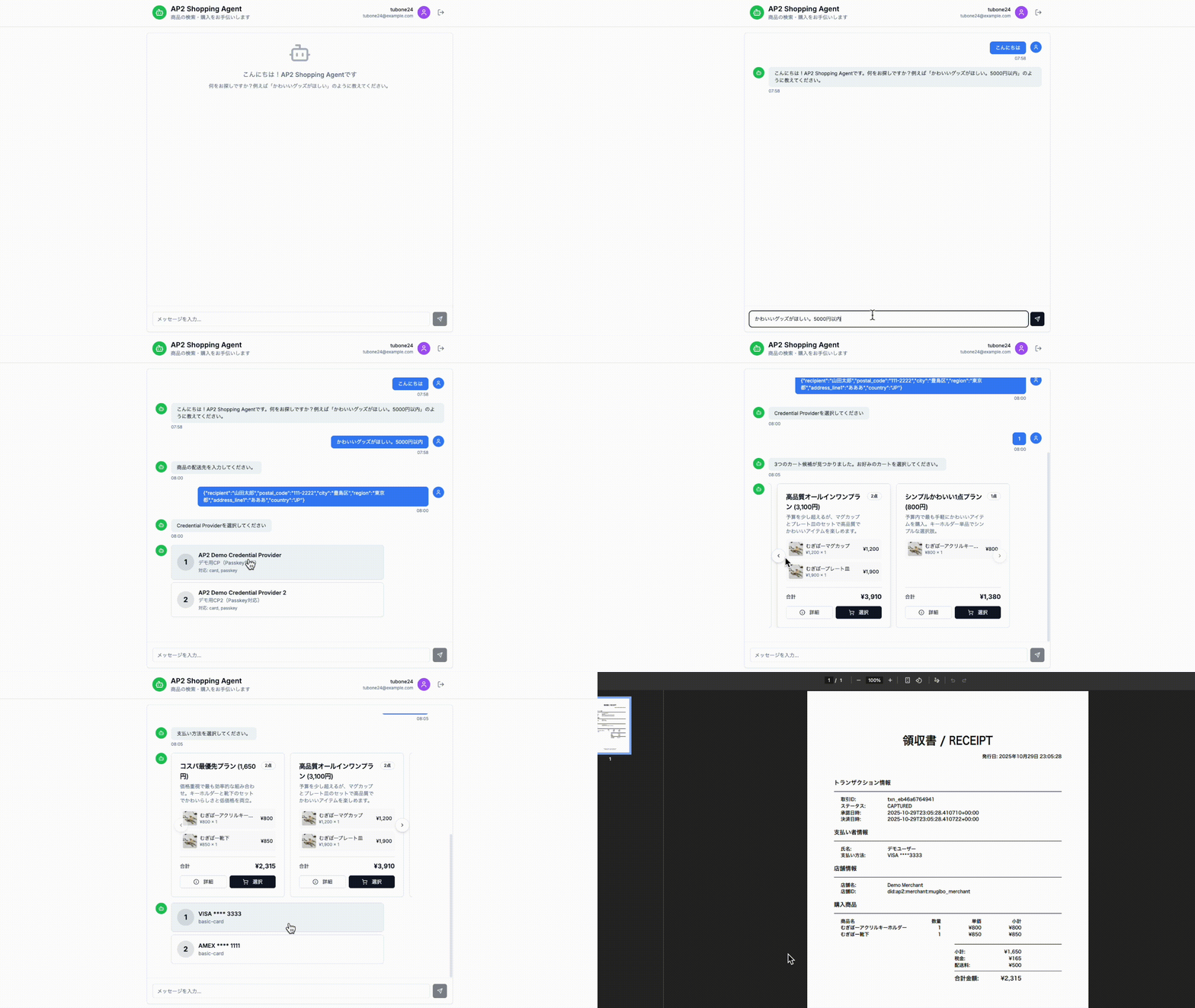
Overview
This application is a implementation of the AP2 (Agent Payments Protocol) specification using a microservices architecture. It features 15 services (7 Backend + 2 MCP + 1 Frontend + 1 Redis + 1 Meilisearch + 1 Jaeger + 1 Payment Network + 1 Init Services) that work together to provide:
- LangGraph AI Conversations - Intelligent dialogue management with OpenAI GPT-4
- MCP (Model Context Protocol) Integration - Tool orchestration for AI agents
- A2UI v0.9 Protocol - Agent-to-User Interface for dynamic form rendering
- Full-text Search - Product search powered by Meilisearch
- KV Store - Session and token management with Redis
- WebAuthn/Passkey Authentication - Secure passwordless authentication
- OpenTelemetry Distributed Tracing - Complete observability with Jaeger
- AP2 Mandate Chain - Intent → Cart → Payment mandate verification
- Payment Network Integration - Complete agent token lifecycle
Architecture Diagram
graph TB
    subgraph "Frontend (Next.js)"
        UI[Chat UI<br/>Merchant Dashboard<br/>Port 3000]
    end

    subgraph "Backend Services"
        SA[Shopping Agent<br/>Port 8000<br/>LangGraph Integration]
        SA_MCP[Shopping Agent MCP<br/>Port 8010<br/>6 MCP Tools]
        MA[Merchant Agent<br/>Port 8001<br/>LangGraph Integration]
        MA_MCP[Merchant Agent MCP<br/>Port 8011<br/>3 MCP Tools]
        M[Merchant<br/>Port 8002<br/>CartMandate Signing]
        CP[Credential Provider<br/>Port 8003<br/>WebAuthn Verification]
        CP2[Credential Provider 2<br/>Port 8006<br/>Multi-CP Support]
        PP[Payment Processor<br/>Port 8004<br/>Payment Processing]
        PN[Payment Network<br/>Port 8005<br/>Agent Token Issuance]
    end

    subgraph "Infrastructure Services"
        REDIS[(Redis<br/>Port 6379<br/>KV Store & Sessions)]
        MEILI[(Meilisearch<br/>Port 7700<br/>Full-text Search)]
        JAEGER[Jaeger<br/>Port 16686<br/>Distributed Tracing]
    end

    subgraph "External Services"
        DMR[DMR/OpenAI<br/>LLM Endpoint]
        LF[Langfuse<br/>LLM Observability]
    end

    subgraph "Data Layer"
        DB[(SQLite Databases<br/>Per-Service Storage)]
        Keys[Encrypted Keys<br/>Ed25519 + ECDSA]
    end

    UI -->|SSE Chat| SA
    UI -->|WebAuthn| CP
    UI -->|Product CRUD| M

    SA -->|LangGraph Tools| SA_MCP
    SA_MCP -->|build_intent<br/>request_carts<br/>select_cart<br/>assess_risk<br/>build_payment<br/>execute_payment| SA

    MA -->|LangGraph Tools| MA_MCP
    MA_MCP -->|search_products<br/>check_inventory<br/>build_cart_mandates| MA
    MA_MCP -->|Full-text Search| MEILI

    SA -->|A2A Message| MA
    MA -->|A2A Message| M
    M -->|A2A Message| SA
    SA -->|A2A Message| PP
    SA -->|A2A Message| CP
    CP -->|POST /network/tokenize| PN
    PP -->|POST /credentials/verify| CP
    PP -->|POST /network/charge| PN

    CP -->|Token/Session<br/>TTL: 15min/10min| REDIS
    PN -->|Agent Token<br/>TTL: 1hour| REDIS

    SA & MA & M & CP & PP -->|Read/Write| DB
    SA & MA & M & CP & PP -->|Load Keys| Keys
    SA & MA & M & CP & PP -.->|Trace| JAEGER

    SA -.->|LLM Query| DMR
    MA -.->|LLM Query| DMR
    SA -.->|Langfuse Trace| LF
    MA -.->|Langfuse Trace| LF

    style UI fill:#e1f5ff
    style SA fill:#fff4e6
    style SA_MCP fill:#e1bee7
    style MA fill:#fff4e6
    style MA_MCP fill:#e1bee7
    style M fill:#fff4e6
    style CP fill:#e8f5e9
    style CP2 fill:#e8f5e9
    style PP fill:#e8f5e9
    style PN fill:#b2dfdb
    style REDIS fill:#fce4ec
    style MEILI fill:#ffccbc
    style JAEGER fill:#c8e6c9
Services Overview
| Service | Port | Type | Role | Technology Stack |
|---|---|---|---|---|
| Frontend | 3000 | UI | User Interface | Next.js 15, TypeScript, shadcn/ui |
| Shopping Agent | 8000 | Backend | User's AI Agent | FastAPI, LangGraph, A2A Protocol |
| Shopping Agent MCP | 8010 | MCP | MCP Tool Server (×6) | FastAPI, MCP Server |
| Merchant Agent | 8001 | Backend | Product Search & Cart Creation | FastAPI, LangGraph, A2A Protocol |
| Merchant Agent MCP | 8011 | MCP | MCP Tool Server (×3) | FastAPI, MCP Server, Meilisearch |
| Merchant | 8002 | Backend | Cart Signing & Inventory | FastAPI, CartMandate Signing |
| Credential Provider | 8003 | Backend | WebAuthn & Token Issuance | FastAPI, WebAuthn, Redis |
| Credential Provider 2 | 8006 | Backend | Multi-CP Support | FastAPI, WebAuthn, Redis |
| Payment Processor | 8004 | Backend | Payment Processing | FastAPI, Receipt Generation |
| Payment Network | 8005 | Backend | Agent Token Lifecycle | FastAPI, Token Issuance & Verification |
| Redis | 6379 | Infra | KV Store & Sessions | Redis 7-alpine, TTL Management |
| Meilisearch | 7700 | Infra | Full-text Search Engine | Meilisearch v1.11 |
| Jaeger | 16686 | Infra | Distributed Tracing | Jaeger All-in-One, OpenTelemetry |
AP2-Compliant Entities
| Entity | Service | Port | Role | AP2 Compliance |
|---|---|---|---|---|
| User | Frontend | 3000 | End User | ✅ WebAuthn Signing (SD-JWT+KB) |
| Shopping Agent | Shopping Agent | 8000 | User's Agent | ✅ IntentMandate/PaymentMandate |
| Merchant Agent | Merchant Agent | 8001 | Product Search | ✅ A2A Protocol |
| Merchant | Merchant | 8002 | Seller | ✅ CartMandate Signing |
| Credential Provider | Credential Provider | 8003 | Authentication | ✅ WebAuthn Verification |
| Payment Processor | Payment Processor | 8004 | Payment Processing | ✅ Mandate Verification |
| Payment Network | Payment Network | 8005 | Token Issuance | ✅ Agent Token Lifecycle |
Sequence Flow Key Points
Phase 1: LangGraph Dialogue Flow
- Intent Collection: Shopping Agent uses LangGraph to gradually collect required information
- State Management:
extract_info→check_completeness→generate_question - Required Fields:
intent,max_amount
Phase 2-4: Mandate Chain Creation
- IntentMandate: User signs with WebAuthn (SD-JWT+KB format)
- CartMandate: Merchant signs with ECDSA + JWT, User signs with WebAuthn
- Challenge Management: Redis-backed with 60-second TTL (replay attack prevention)
Phase 5: AP2 Payment Flow (Steps 17-29)
Step 17-19: Tokenization
- User selects payment method
- Credential Provider tokenizes payment method
- Token stored in Redis (TTL: 15 minutes)
Step 20-22: PaymentMandate Creation
- Shopping Agent creates PaymentMandate
- Risk assessment performed (amount, method, user history)
Step 23: Agent Token Issuance
- User signs PaymentMandate with WebAuthn
- Credential Provider requests Agent Token from Payment Network
- Payment Network issues Agent Token (stored in Redis, TTL: 1 hour)
- Agent Token associated with payment_method_token
Step 26-27: Credential Verification
- Payment Processor verifies credential token with Credential Provider
- Credential Provider returns agent_token from token_data
Step 28: Payment Execution
- Payment Processor calls Payment Network with agent_token
- Payment Network verifies agent_token
- Payment Network executes charge (stub implementation)
- Returns network_transaction_id and authorization_code
Step 29: Receipt Generation
- Payment Processor generates PDF receipt
- Receipt URL sent to Credential Provider
- User receives receipt download link
Security Features
- Cryptographic Signatures: All A2A messages signed with Ed25519/ECDSA
- WebAuthn Authentication: Passwordless authentication with Passkey
- SD-JWT+KB: Selective Disclosure JWT with Key Binding for user authorization
- Challenge-Response: Redis-backed challenges with TTL (replay attack prevention)
- Token Lifecycle: Proper TTL management (payment_method_token: 15min, agent_token: 1hour)
- Mandate Chain Verification: Complete validation of Intent → Cart → Payment chain
Getting Started
Prerequisites
- Docker & Docker Compose
- OpenAI API Key (for LangGraph) or DMR endpoint
Quick Start
1. Environment Setup
cd /path/to/ap2/

# Create .env file
cat > .env << 'EOF'
# OpenAI API (Required for LangGraph)
OPENAI_API_KEY=sk-proj-your-api-key-here

# DMR Endpoint (alternative to OpenAI)
DMR_API_URL=http://host.docker.internal:12434/engines/llama.cpp/v1
DMR_MODEL=ai/qwen3
DMR_API_KEY=none

# Logging
LOG_LEVEL=INFO
LOG_FORMAT=text

# Langfuse (Optional)
LANGFUSE_ENABLED=false
LANGFUSE_PUBLIC_KEY=
LANGFUSE_SECRET_KEY=
LANGFUSE_HOST=https://cloud.langfuse.com

# OpenTelemetry
OTEL_ENABLED=true
EOF
Note: If you're using DMR (alternative to OpenAI), you need to set up DMR before starting the services. See DMR Setup below.
2. DMR Setup (Optional)
If you want to use DMR instead of OpenAI for LangGraph's LLM inference, follow these steps:
What is DMR?
- DMR is a local LLM inference engine that provides an OpenAI-compatible API
- Useful for development/testing without OpenAI API costs
- Supports various models (Qwen, Llama, etc.)
Installation:
# 1. Install DMR (example using Homebrew on macOS)
brew install dmr

# Or download from DMR releases
# https://github.com/your-dmr-repo/releases

# 2. Download and configure a model (e.g., Qwen3)
dmr pull ai/qwen3

# 3. Start DMR server
dmr serve --port 12434

# 4. Verify DMR is running
curl http://localhost:12434/v1/models
Configuration:
In your .env file, set:
DMR_API_URL=http://host.docker.internal:12434/engines/llama.cpp/v1
DMR_MODEL=ai/qwen3
DMR_API_KEY=none
Note: host.docker.internal allows Docker containers to access the host machine's localhost.
Alternative: Use OpenAI
If you don't want to set up DMR, simply provide your OpenAI API key:
OPENAI_API_KEY=sk-proj-your-api-key-here
The Shopping Agent will automatically use OpenAI if OPENAI_API_KEY is set.
3. Start All Services
# Build and start all services
docker compose up --build

# Or run in background
docker compose up --build -d
This will start all 15 services:
- 7 Backend Services: Shopping Agent, Merchant Agent, Merchant, Credential Provider (×2), Payment Processor, Payment Network
- 2 MCP Services: Shopping Agent MCP, Merchant Agent MCP
- 1 Frontend: Next.js
- 3 Infrastructure Services: Redis, Meilisearch, Jaeger
- 2 Init Services: init-keys, init-seeds (run once at startup)
4. Verify Services
# Check service health
curl http://localhost:8000/health  # Shopping Agent
curl http://localhost:8001/health  # Merchant Agent
curl http://localhost:8002/health  # Merchant
curl http://localhost:8003/health  # Credential Provider
curl http://localhost:8004/health  # Payment Processor
curl http://localhost:8005/health  # Payment Network

# Access web interfaces
open http://localhost:3000          # Frontend
open http://localhost:3000/chat     # Chat UI (main demo)
open http://localhost:3000/merchant # Merchant Dashboard
open http://localhost:16686         # Jaeger UI (tracing)
open http://localhost:7700          # Meilisearch UI
5. Demo Flow
- Passkey Registration - Register at
/chaton first visit - Product Search - Enter "I want cute merchandise"
- Intent Signing - Enter max budget and sign with Passkey
- Cart Selection - LLM proposes carts, select one
- Cart Signing - Review cart contents and sign with Passkey
- Payment - Select payment method and sign
- Receipt - Download PDF receipt after payment completion
6. View Logs
# All services
docker compose logs -f

# Specific service
docker compose logs -f shopping_agent
docker compose logs -f payment_processor
docker compose logs -f payment_network

# Filter for Payment Network integration
docker compose logs -f payment_processor payment_network credential_provider | grep -E "(agent_token|charge|tokenize)"
6. Stop Services
# Stop (keep containers)
docker compose stop

# Stop and remove containers
docker compose down

# Remove everything including volumes
docker compose down -v
Development Setup (Local Execution)
For local development without Docker:
# Install Python dependencies
cd /path/to/ap2/
pip install -e .

# Frontend dependencies
cd frontend/
npm install

# Set environment variables
export OPENAI_API_KEY=sk-proj-your-api-key-here
export LOG_LEVEL=INFO

# Start services in separate terminals
# Terminal 1: Shopping Agent
cd services/shopping_agent && python main.py

# Terminal 2: Merchant Agent
cd services/merchant_agent && python main.py

# Terminal 3: Merchant
cd services/merchant && python main.py

# Terminal 4: Credential Provider
cd services/credential_provider && python main.py

# Terminal 5: Payment Processor
cd services/payment_processor && python main.py

# Terminal 6: Payment Network
cd services/payment_network && python main.py

# Terminal 7: Frontend
cd frontend && npm run dev
Testing
This project includes comprehensive test coverage for core functionality.
Running Tests
# Install test dependencies
uv pip install --system pytest pytest-asyncio

# Run all tests
pytest tests/ -v

# Run specific test file
pytest tests/test_crypto.py -v

# Run specific test class
pytest tests/test_database.py::TestProductCRUD -v

# Run with coverage (requires pytest-cov)
pytest tests/ --cov=common --cov=services --cov-report=html
Test Structure
tests/
├── __init__.py
├── conftest.py                        # Pytest fixtures and configuration
├── test_crypto.py                     # Cryptography tests (21 tests)
├── test_database.py                   # Database CRUD tests (28 tests)
├── test_shopping_agent_api.py         # Shopping Agent API tests (14 tests)
└── test_payment_processor_api.py      # Payment Processor API tests (13 tests)
Test Coverage
Cryptography Module (
common/crypto.py):- JSON canonicalization and mandate hashing
- ECDSA and Ed25519 key generation/management
- Signature creation and verification
- Secure storage encryption/decryption
- WebAuthn challenge management
- Device attestation
Database Module (
common/database.py):- Product, User, Mandate CRUD operations
- Transaction and session management
- Passkey credential storage
- Payment method and receipt management
API Modules:
- Shopping Agent authentication and mandate structures
- Payment Processor validation and tokenization
- A2A message structures
- Risk assessment logic
Continuous Integration
Tests are automatically run on every push and pull request via GitHub Actions:
# .github/workflows/test.yml
# Tests run on Python 3.10 and 3.11
View test results in the Actions tab of the GitHub repository.
Technology Stack
Backend
- FastAPI 0.115.0 - High-performance web framework
- SQLAlchemy 2.0.35 - ORM
- aiosqlite 0.20.0 - Async SQLite
- cryptography 43.0.0 - ECDSA signing & AES-256-CBC encryption
- fido2 1.1.3 - WebAuthn verification
- sse-starlette 2.1.0 - Server-Sent Events
- httpx 0.27.0 - Async HTTP client
- LangGraph - LLM conversation flow management
- LangChain 0.3.0+ - LLM integration (OpenAI-compatible API)
- Langfuse 2.0.0+ - LLM Observability
- ReportLab - PDF generation
- PyJWT - JWT signing
- redis 5.0.0+ - Redis KV client
Frontend
- Next.js 15.1.4 (App Router)
- React 19.0.0
- TypeScript 5.x
- TailwindCSS 3.4.1
- shadcn/ui - UI component library
- WebAuthn API - Passkey signing
- A2UI v0.9 - Agent-to-User Interface protocol for dynamic UI rendering
Infrastructure
- Docker + Docker Compose - Container orchestration
- SQLite - Development database
- Redis 7-alpine - KV store & session management
- Meilisearch v1.11 - Full-text search engine
- Jaeger - Distributed tracing (OpenTelemetry)
Project Structure
ap2/
├── common/                      # Shared modules
│   ├── models.py                # Pydantic models (A2A messages, API types)
│   ├── a2a_handler.py           # A2A message handling
│   ├── base_agent.py            # Base class for all agents
│   ├── database.py              # SQLAlchemy models + CRUD
│   ├── redis_client.py          # Redis KV client (TokenStore, SessionStore)
│   ├── crypto.py                # Ed25519/ECDSA signing, AES-256 encryption
│   ├── logger.py                # Unified logging (JSON/text)
│   ├── user_authorization.py    # SD-JWT+KB verification
│   ├── risk_assessment.py       # Risk assessment engine
│   └── receipt_generator.py    # PDF receipt generation
│
├── services/                    # Microservices
│   ├── shopping_agent/          # Shopping Agent (Port 8000)
│   ├── shopping_agent_mcp/      # Shopping Agent MCP (Port 8010)
│   ├── merchant_agent/          # Merchant Agent (Port 8001)
│   ├── merchant_agent_mcp/      # Merchant Agent MCP (Port 8011)
│   ├── merchant/                # Merchant (Port 8002)
│   ├── credential_provider/     # Credential Provider (Port 8003)
│   ├── payment_processor/       # Payment Processor (Port 8004)
│   └── payment_network/         # Payment Network (Port 8005)
│
├── frontend/                    # Next.js frontend (Port 3000)
│   ├── app/                     # App Router
│   │   ├── page.tsx             # Home page
│   │   ├── chat/page.tsx        # Chat UI (SSE/Streaming)
│   │   └── merchant/page.tsx    # Merchant Dashboard
│   ├── components/              # React components
│   └── lib/                     # Utilities & types
│
├── scripts/                     # Utility scripts
│   ├── init_keys.py             # Key pair initialization
│   └── init_seeds.py            # Seed data injection
│
├── data/                        # Persistent data (Docker Volume)
│   ├── *.db                     # SQLite databases (per service)
│   ├── receipts/                # PDF receipts
│   └── did_documents/           # DID Documents
│
├── keys/                        # Encrypted keys (Docker Volume)
│   └── *_private.pem            # Ed25519/ECDSA private keys (AES-256)
│
├── docker-compose.yml           # Service orchestration
├── pyproject.toml               # Python dependencies (uv)
└── README.md                    # This file
API Endpoints
Common Endpoints (All Services)
All services expose these endpoints:
GET /- Health check (returns agent_id, agent_name, status, version)GET /health- Health check (for Docker)POST /a2a/message- A2A message reception (auto-implemented by BaseAgent)
Shopping Agent (Port 8000)
User Interaction:
POST /chat/stream- Chat dialogue (SSE Streaming)POST /create-intent- Create IntentMandatePOST /create-payment- Create PaymentMandateGET /transactions/{transaction_id}- Get transaction
Merchant Agent (Port 8001)
Product Search & Cart Creation:
GET /products?query=...&limit=10- Product searchPOST /create-cart- Create CartMandate (unsigned)
Merchant (Port 8002)
Cart Signing & Inventory:
POST /sign/cart- Sign CartMandateGET /inventory/{sku}- Check inventoryGET /products- List productsPOST /products- Add product
Credential Provider (Port 8003)
WebAuthn & Token Issuance:
POST /attestations/verify- Verify WebAuthn attestationGET /payment-methods?user_id=...- List payment methodsPOST /payment-methods- Add payment methodPOST /payment-methods/tokenize- Tokenize payment methodPOST /credentials/verify- Verify credential token (returns agent_token)GET /webauthn/options- Get WebAuthn challenge
Payment Processor (Port 8004)
Payment Processing:
POST /process- Execute paymentGET /transactions/{transaction_id}- Get transactionPOST /refund- Process refundGET /receipts/{transaction_id}.pdf- Download PDF receipt (JWT-authenticated)
Payment Network (Port 8005)
Agent Token Lifecycle:
POST /network/tokenize- Issue Agent Token (AP2 Step 23)POST /network/verify-token- Verify Agent TokenPOST /network/charge- Execute payment charge (AP2 Step 28)GET /network/info- Get network information
AP2 Specification Compliance
This application fully implements the AP2 (Agent Payments Protocol) v0.2 specification:
Mandate Chain
- IntentMandate - User's purchase intent (max_amount, categories)
- CartMandate - Specific cart contents (Merchant signature + User signature)
- PaymentMandate - Payment information (payment method, risk score)
Payment Flow (AP2 Steps 17-29)
- Step 17-19: Payment method selection & tokenization
- Step 20-22: PaymentMandate creation with risk assessment
- Step 23: Agent Token issuance from Payment Network
- Step 24-25: Payment execution request
- Step 26-27: Credential verification & agent token retrieval
- Step 28: Payment charge via Payment Network
- Step 29: Receipt generation & notification
Security Features
- SD-JWT+KB: Selective Disclosure JWT with Key Binding for user_authorization
- Merchant Authorization: ECDSA + JWT signatures for CartMandate
- WebAuthn: FIDO2-based passwordless authentication
- Challenge-Response: Replay attack prevention with Redis TTL
- Token Lifecycle: Proper TTL management for all tokens
A2UI v0.9 Protocol Support
This application implements the A2UI (Agent-to-User Interface) protocol v0.9 for dynamic UI rendering during the shopping flow.
What is A2UI?
A2UI is a protocol that allows AI agents to dynamically render UI components in the user's interface. Instead of hardcoding UI for each interaction type, the agent sends structured messages describing what UI to display, and the frontend renders it accordingly.
Reference: A2UI Specification v0.9
A2UI Message Types
| Message Type | Description |
|---|---|
createSurface |
Initialize a new UI surface with a unique ID |
updateComponents |
Provide component definitions (layout, fields, buttons) |
updateDataModel |
Send/update data for two-way binding |
deleteSurface |
Remove a surface when no longer needed |
Supported A2UI Components
| Component | Description | Usage |
|---|---|---|
Text |
Text display with style hints | Labels, headings, descriptions |
TextField |
Text input with validation | Form fields (name, address, email) |
Button |
Clickable button with action | Submit, cancel, navigation |
ChoicePicker |
Radio/checkbox selection | Country selection, payment method |
Card |
Container with optional click action | Credential provider cards |
Column |
Vertical layout | Form layout |
Row |
Horizontal layout | Button groups |
Divider |
Visual separator | Section breaks |
Image |
Image display | Product images, logos |
A2UI in Shopping Flow
A2UI is used in the following steps:
Shipping Form (
shipping_form)- Dynamic form with TextField components for address input
- ChoicePicker for country/region selection
- Two-way data binding with validation
Credential Provider Selection (
cp_selection)- Card components for each available provider
- Click action to select a provider
Payment Method Selection (
payment_method_selection)- Card components showing saved payment methods
- Click action to select and proceed
A2UI v0.9 Envelope Format
A2UI v0.9 uses a simplified envelope format without a type field:
// createSurface
{"createSurface": {"surfaceId": "shipping-form-abc123", "catalogId": "..."}}

// updateComponents
{"updateComponents": {"surfaceId": "shipping-form-abc123", "components": [...]}}

// updateDataModel
{"updateDataModel": {"surfaceId": "shipping-form-abc123", "path": "/", "op": "replace", "value": {...}}}
Implementation Files
| File | Description |
|---|---|
services/shopping_agent/utils/a2ui_builders.py |
Backend A2UI message generators |
frontend/hooks/useSSEChat.ts |
SSE parsing for A2UI events |
frontend/components/a2ui/A2UISurfaceRenderer.tsx |
React component renderer |
frontend/lib/types/a2ui.ts |
TypeScript type definitions |
frontend/lib/a2ui/jsonPointer.ts |
JSON Pointer (RFC 6901) utilities |
frontend/lib/a2ui/userAction.ts |
User action message builder |
References
- AP2 Official Specification
- A2UI Specification v0.9
- Google AP2 Samples
- W3C Payment Request API
- WebAuthn Specification
Troubleshooting
Database Errors
# Reset databases
rm -rf data/*.db

# Reinitialize
docker compose up init-seeds
Key Generation Errors
# Reset keys
rm -rf keys/*

# Services will auto-generate keys on restart
docker compose restart
Port Conflicts
# Check port usage
lsof -ti:8000 | xargs kill -9  # Kill process on port 8000
Redis Connection Errors
# Restart Redis
docker compose restart redis

# Check Redis health
docker compose exec redis redis-cli ping
Similar projects


Connect AI agents across any network — zero config, encrypted, skill-based routing


Skills & plugins for agentic commerce : UCP, ACP, AP2, A2A, WebMCP, Magento 2, BigCommerce, WooCommerce


The open authority layer + SDKs for AI-agent payments. Thin Python/TS clients, an MCP server, framework adapters (LangChain/CrewAI/Hermes/OpenClaw/…), and @sardis/reference — a pure policy simulator + AP2/TAP/x402 verifiers showing exactly how Sardis decides if an agent may spend. The hosted engine that moves money is private.


Plausible is a proof of anything protocol for Algorand


The AI-to-AI Protocol Layer that catches unreliable agent outputs before they cost you money. Claim-level verification, escrow, and slashing. 224 tests, 12/12 adversarial patterns caught.


Trust-gated AI agent examples. Check CraftedTrust before connecting to any MCP server. Python (LangGraph) + TypeScript.

More AP2 projects
All AP2 projects →
Lucid Agents Commerce SDK. Bootstrap AI agents in 60 seconds that can pay, sell, and participate in agentic commerce supply chains. Our protocol agnostic SDK provides CLI-generated templates and drop-in adapters for Hono, Express, Next.js, and TanStack, giving you instant access to crypto/fiat payment rails (AP2, A2A, x402, ERC8004).


Building blocks for Agentic payments (x402, MPP, AP2) for TypeScript, Rust, Go, Python, Ruby, PHP, Lua, Kotlin and Swift.

Building blocks for Agentic payments (x402, MPP, AP2) for TypeScript, Rust, Go, Python, Ruby, PHP, Lua, Kotlin and Swift.


Trust infrastructure for million-agent economies on Solana - identity, reputation, and validation designed for continuous feedback at scale.


A chain-agnostic AI-native payment infrastructure, authz layer for x402


🚀 Curated resources for Google's Agent Payments Protocol (AP2), A2A & x402 — blogs, videos, repos & specs. Contributions welcome!
