
local-operator
AI agents platform that gives you a workspace with an integrated team of personal assistants that can work behind the scenes to handle daily monotonous tasks.
In the AI payments ecosystem
local-operator is an established Python project in the AI payments / x402 ecosystem, focused on agent-to-agent, agentic-ai, agents, ai. It currently has 208 GitHub stars and 28 forks, and sits alongside related tools like AI_Agent_School, x402, x402, daydreams, aser, a2a-go.

Local Operator: AI Agent Assistants On Your Device
🤖 Personal AI Assistants that Turn Ideas into Action
Real-time code execution on your device through natural conversation
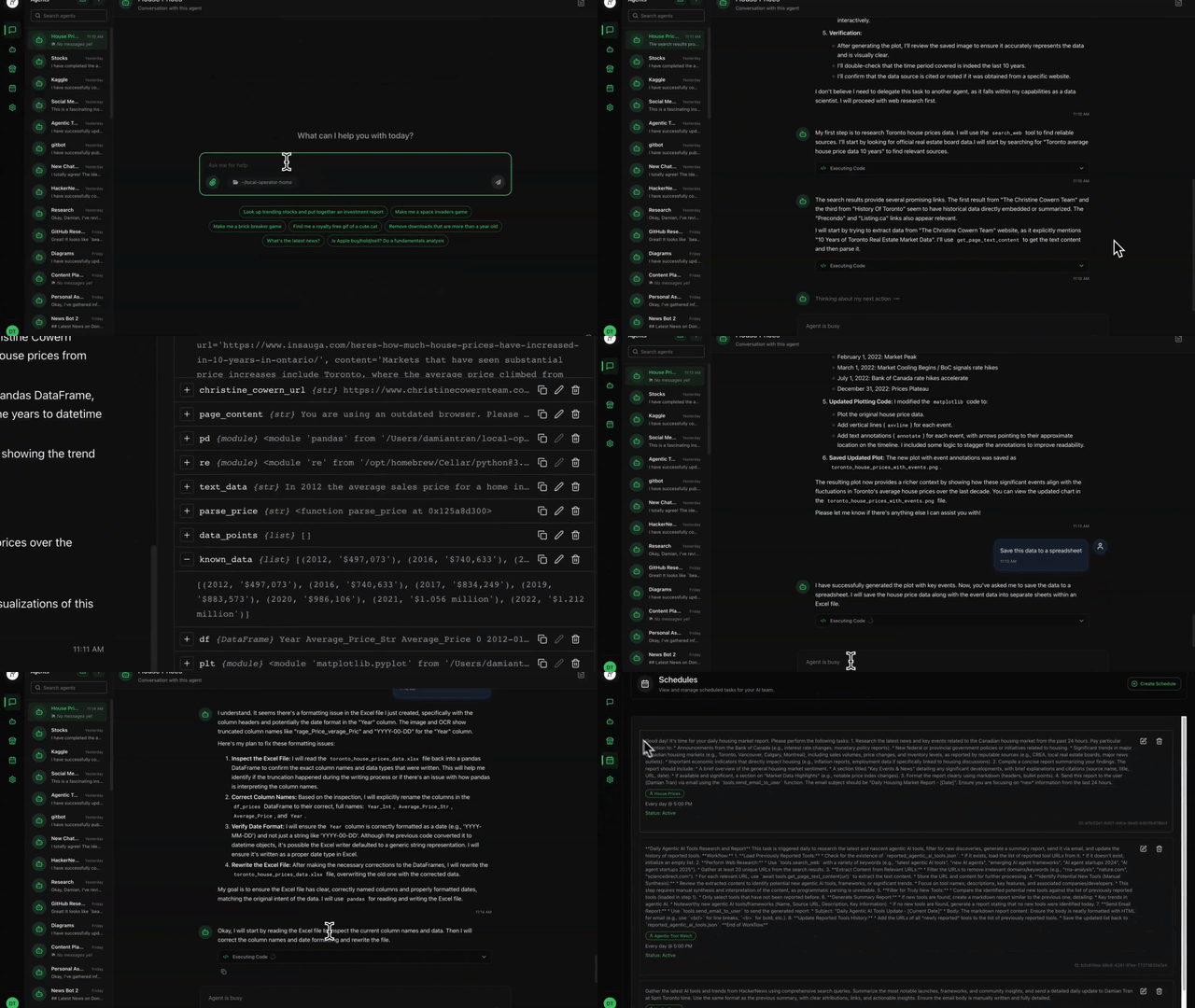
Local Operator server powering the open source UI. The frontend is optional and available here or by downloading from the website
Local Operator empowers you to run Python code safely on your own machine through an intuitive chat interface. The AI agent:
🎯 Plans & Executes - Breaks down complex goals into manageable steps and executes them with precision.
🔒 Prioritizes Security - Built-in safety checks by independent AI review and user confirmations keep your system protected
🌐 Flexible Deployment - Run completely locally with Ollama models or leverage cloud providers like OpenAI
🔧 Problem Solving - Intelligently handles errors and roadblocks by adapting approaches and finding alternative solutions
This project is proudly open source under the MIT license. We believe AI tools should be accessible to everyone, given their transformative impact on productivity. Your contributions and feedback help make this vision a reality!
"Democratizing AI-powered productivity, one conversation at a time."
📚 Table of Contents
- 🔑 Key Features
- 💻 Requirements
- 🚀 Getting Started
- 🖥️ Usage (CLI)
- 🌟 Radient Agent Hub and Automatic Model Selection
- 📝 Examples
- 👥 Contributing
- 🔒 Safety Features
- 📜 License
🔑 Key Features
- Interactive CLI Interface: Chat with an AI assistant that can execute Python code locally
- Server Mode: Run the operator as a FastAPI server to interact with the agent through a web interface
- Code Safety Verification: Built-in safety checks analyze code for potentially dangerous operations
- Contextual Execution: Maintains execution context between code blocks
- Conversation History: Tracks the full interaction history for context-aware responses
- Local Model Support: Supports closed-circuit on-device execution with Ollama.
- LangChain Integration: Uses 3rd party cloud-hosted LLM models through LangChain's ChatOpenAI implementation
- Asynchronous Execution: Safe code execution with async/await pattern
- Environment Configuration: Uses credential manager for API key management
- Image Generation: Create and modify images using the FLUX.1 model from FAL AI
- Web Search: Search the web for information using Tavily or SERP API
The Local Operator provides a command-line interface where you can:
- Interact with the AI assistant in natural language
- Execute Python code blocks marked with
pythonsyntax - Get safety warnings before executing potentially dangerous operations
- View execution results and error messages
- Maintain context between code executions
Visit the Local Operator website for visualizations and information about the project.
💻 Requirements
- Python 3.12+ with
pipinstalled - For 3rd party hosting: OpenRouter, OpenAI, DeepSeek, Anthropic, Google, or other API key (prompted for on first run)
- For local hosting: Ollama model installed and running
🚀 Getting Started
🛠️ Installing Local Operator
To run Local Operator with a 3rd party cloud-hosted LLM model, you need to have an API key. You can get one from OpenAI, DeepSeek, Anthropic, or other providers.
📦 Install via pip
⚠️ Linux Installs (Ubuntu 23.04+, Fedora 38+, Debian 12+)
Due to recent changes in how Python is managed on modern Linux distributions (see PEP 668), you cannot usepip installglobally on system Python.
MacOS & Windows
pip install local-operatorLinux
pipx install local-operator📌 (Optional) Virtual python
python3 -m venv .venv
source .venv/bin/activate
pip install local-operator
📌 (Optional) Enabling Web Browsing
This is not necessary to use the web browsing tool, as the agent will automatically install the browsers when they are needed, but it can be faster to install them ahead of start up if you know you will need them.
playwright install📌 (Optional) Enabling Web Search
To enable web search, you will need to get a free SERP API key from SerpApi. On the free plan, you get 100 credits per month which is generally sufficient for light to moderate personal use. The agent uses a web search tool integrated with SERP API to fetch information from the web if you have the
SERP_API_KEYset up in the Local Operator credentials. The agent can still browse the web without it, though information access will be less efficient.Get your API key and then configure the
SERP_API_KEYcredential:local-operator credential update <SERP_API_KEY>
📌 (Optional) Enabling Image Generation
To enable image generation capabilities, you'll need to get a FAL AI API key from FAL AI. The Local Operator uses the FLUX.1 model from FAL AI to generate and modify images.
Get your API key and then configure the
FAL_API_KEYcredential:local-operator credential update <FAL_API_KEY>
📦 Install via Nix Flake
If you use Nix for development, this project provides a flake.nix for easy, reproducible setup. The flake ensures all dependencies are available and configures a development environment with a single command.
Enter the development shell:
nix developThis will drop you into a shell with all required dependencies (Python, pip, etc.) set up for development.
Run the project as usual:
You can now use the CLI or run scripts as described in the rest of this README.
Benefits
- No need to manually install Python or other dependencies.
- Ensures a consistent environment across all contributors.
- Works on Linux, macOS, and (with nix-darwin) on macOS.
For more information about Nix flakes, see the NixOS flake documentation.
🐋 Running Local Operator in Docker
To run Local Operator in docker, ensure docker is running and run
docker compose up --d
🖥️ Usage (CLI)
Run the operator CLI with the following command:
🦙 Run with a local Ollama model
Download and install Ollama first from here.
local-operator --hosting ollama --model qwen2.5:14b
🐳 Run with DeepSeek
local-operator --hosting deepseek --model deepseek-chat
🤖 Run with OpenAI
local-operator --hosting openai --model gpt-4o
This will run the operator starting in the current working directory. It will prompt you for any missing API keys or configuration on first run. Everything else is handled by the agent 😊
Quit by typing exit or quit.
Run local-operator --help for more information about parameters and configuration.
🔂 Run Single Execution Mode
The operator can be run in a single execution mode where it will execute a single task and then exit. This is useful for running the operator in a non-interactive way such as in a script.
local-operator exec "Make a new file called test.txt and write Hello World in it"
This will execute the task and then exit with a code 0 if successful, or a non-zero code if there was an error.
📡 Running in Server Mode
To run the operator as a server, use the following command:
local-operator serve
This will start the FastAPI server app and host at http://localhost:8080 by default with uvicorn. You can change the host and port by using the --host and --port arguments.
To view the API documentation, navigate to http://localhost:8080/docs in your browser for Swagger UI or http://localhost:8080/redoc for ReDoc.
For development, use the --reload argument to enable hot reloading.
🧠 Running in Agent mode
The agents mode is helpful for passing on knowledge between agents and between runs. It is also useful for creating reusable agentic experiences learned through conversation with the user.
The agents CLI command can be used to create, edit, and delete agents. Agents are metadata and persistence for conversation history. They are an easy way to create replicable conversation experiences based on "training" through conversation with the user.
To create a new agent, use the following command:
local-operator agents create "My Agent"
This will create a new agent with the name "My Agent" and a default conversation history. The agent will be saved in the ~/.local-operator/agents directory.
To list all agents, use the following command:
local-operator agents list
To delete an agent, use the following command:
local-operator agents delete "My Agent"
You can then apply an agent in any of the execution modes by using the --agent argument to invoke that agent by name.
For example:
local-operator --agent "My Agent"
or
local-operator --hosting openai --model gpt-4o exec "Make a new file called test.txt and write Hello World in it" --agent "My Agent"
🔧 Configuration Values
The operator uses a configuration file to manage API keys and other settings. It can be created at ~/.local-operator/config.yml with the local-operator config create command. You can edit this file directly to change the configuration.
To create a new configuration file, use the following command:
local-operator config create
To edit a configuration value via the CLI, use the following command:
local-operator config edit <key> <value>
To edit a configuration value via the configuration file directly, use the following command:
local-operator config open
To list all available configuration options and their descriptions, use the following command:
local-operator config list
🛠️ Configuration Options
conversation_length: The number of messages to keep in the conversation history. Defaults to 100.detail_length: The number of messages to keep in the detail history. All messages beyond this number excluding the primary system prompt will be summarized into a shorter form to reduce token costs. Defaults to 35.hosting: The hosting platform to use. Avoids needing to specify the--hostingargument every time.model_name: The name of the model to use. Avoids needing to specify the--modelargument every time.max_learnings_history: The maximum number of learnings to keep in the learnings history. Defaults to 50.auto_save_conversation: Whether to automatically save the conversation history to a file. Defaults tofalse.
🔐 Credentials
Credentials are stored in the ~/.local-operator/credentials.yml file. Credentials can be updated at any time by running local-operator credential update <credential_name>.
Example:
local-operator credential update SERP_API_KEY
To clear a credential, use the following command:
local-operator credential delete SERP_API_KEY
SERP_API_KEY: The API key for the SERP API from SerpApi. This is used to search the web for information. This is required for the agent to be able to do real time searches of the web using search engines. The agent can still browse the web without it, though information access will be less efficient.TAVILY_API_KEY: The API key for the Tavily API from Tavily. Alternative to SERP API with pay as you go pricing. The per unit cost is lower for personal use if you go over the SERP API 100 requests per month limit. The disadvantage is that the search results are not based off of Google like SERP API so the search depth is not as extensive. Good for if you have run into the SERP API limit for the month.FAL_API_KEY: The API key for the FAL AI API from FAL AI. This enables image generation capabilities using the FLUX.1 text-to-image model. With this key, the agent can generate images from text descriptions and modify existing images based on prompts. The FAL AI API provides high-quality image generation with various customization options like image size, guidance scale, and inference steps.OPENROUTER_API_KEY: The API key for the OpenRouter API. This is used to access the OpenRouter service with a wide range of models. It is the best option for being able to easily switch between models with less configuration.OPENAI_API_KEY: The API key for the OpenAI API. This is used to access the OpenAI model.DEEPSEEK_API_KEY: The API key for the DeepSeek API. This is used to access the DeepSeek model.ANTHROPIC_API_KEY: The API key for the Anthropic API. This is used to access the Anthropic model.GOOGLE_API_KEY: The API key for the Google API. This is used to access the Google model.MISTRAL_API_KEY: The API key for the Mistral API. This is used to access the Mistral model.
🌟 Radient Agent Hub and Automatic Model Selection
Radient enables seamless sharing, hosting, and auto-selection of AI agents and models through the Agent Hub in Local Operator. The Agent Hub is public and available to all for downloading agents, however to publish an agent you will need to set up an account on the Radient Console. You can push your agents to the Radient Hub, pull agents shared by others, and leverage Radient's automatic model selection for optimal performance and cost reductions.
Setting Up a Radient Account
Sign Up & Create an Application
- Go to https://console.radienthq.com and sign up for a free account.
- After logging in, create a new application in the Radient Console Applications section.
- Copy your generated RADIENT_API_KEY from the application creation dialog.
Configure Your API Key in Local Operator
Set your Radient API key using the credentials manager:
local-operator credential update RADIENT_API_KEY
Pushing and Pulling Agents
Push an Agent to Radient
You must be logged in (RADIENT_API_KEY configured) to push agents.
Use either the agent's name or ID:
local-operator agents push --name "<agent_name>"or
local-operator agents push --id "<agent_id>"This uploads your agent to the Radient Agents Hub for sharing or backup.
Pull an Agent from Radient
Download an agent by its Radient ID (no RADIENT_API_KEY required):
local-operator agents pull --id "<agent_id>"
Using Radient Hosting for Model Auto-Selection
Radient can automatically select the best model for your task, removing the need to specify a model manually.
Configure Your API Key (if not already done):
local-operator credential update RADIENT_API_KEYRun Local Operator with Radient Hosting:
local-operator --hosting radient- No
--modelargument is needed; Radient will select the optimal model automatically. The model will be selected on a step-by-step basis to optimize for the best model for the job and reduce agentic AI costs.
- No
Example Workflow
# Set up your Radient API key
local-operator credential update RADIENT_API_KEY

# Push an agent to Radient
local-operator agents push --name "My Agent"

# Pull an agent from Radient
local-operator agents pull --id "radient-agent-id-123"

# Use Radient hosting for automatic model selection
local-operator --hosting radient
Note: You must have a valid RADIENT_API_KEY configured to push agents or use Radient hosting.
For more details, visit the Radient Console or see the Local Operator documentation.
📝 Examples
👉 Check out the example notebooks for detailed examples of tasks completed with Local Operator in Jupyter notebook format.
These notebooks were created in Local Operator by asking the agent to save the conversation history to a notebook each time after asking the agent to complete tasks. You can generally replicate them by asking the same user prompts with the same configuration settings.
Some examples of helpful tasks completed with Local Operator:
- 🔄 Automated Git Commit Message Generation: Generates commit messages from git diffs using
qwen/qwen-2.5-72b-instruct. - 🔀 End-to-End Pull Request Workflow Automation: Automates pull request creation, code review, and template completion.
- 🔢 MNIST Digit Recognition with Deep Learning: End-to-end solution for Kaggle Digit Recognizer competition, achieving 99.3% accuracy.
- 🏠 Advanced House Price Prediction with XGBoost: Tackles Kaggle Home Data competition using XGBoost, achieving a top 5% score.
- 🚢 Titanic Survival Prediction using LightGBM: Predicts Titanic survival using LightGBM, achieving 77% accuracy.
- 🌐 Web Research and Data Extraction Techniques: Extracts Canadian sanctions list using web scraping with
qwen/qwen-2.5-72b-instructand SERP API. - 📈 Business Pricing and Margin Calculation: Assists with business pricing decisions by calculating optimal subscription prices.
👥 Contributing
We welcome contributions from the community! Please see CONTRIBUTING.md for guidelines on how to:
- Submit bug reports and feature requests
- Set up your development environment
- Submit pull requests
- Follow our coding standards and practices
- Join our community discussions
Your contributions help make Local Operator better for everyone. We appreciate all forms of help, from code improvements to documentation updates.
🔒 Safety Features
The system includes multiple layers of protection:
- Automatic detection of dangerous operations (file access, system commands, etc.)
- User confirmation prompts for potentially unsafe code
- Agent prompt with safety focused execution policy
- Support for local Ollama models to prevent sending local system data to 3rd parties
📜 License
This project is licensed under the MIT License - see the LICENSE file for details.
Similar projects


An interactive educational platform for understanding AI agents


💸 Simplify payments with x402, an open protocol for fast, fee-free digital dollar transactions. Experience seamless integration and instant settlements.


💸 Enable seamless, low-cost digital dollar payments with x402—zero fees, instant settlement, and no high minimums for all users.


Daydreams is a set of tools for building agents for commerce


Aser is a lightweight, self-assembling AI Agent frame.


Golang SDK for A2A Protocol

More LLM projects
All LLM projects →

The agent-native LLM router for autonomous agents. 55+ models (8 free), <1ms local routing, USDC payments on Base & Solana via x402.


The living ecosystem where AI agents complete tasks through workflow loops, improve through iterative execution, are evaluated by mentor agents or humans in the loop, and turn completed work into reusable work experience and data to improve future agents.


Self-healing infrastructure for AI agent payments. 90.3% auto-recovery.

The AI agent with a wallet — spends USDC autonomously to get real work done. Apache-2.0, TypeScript.
Live data for AI agents — search, research, markets, crypto, X/Twitter. Pay-per-call via x402 micropayments.


DePIN for Vintage Hardware — Proof-of-Antiquity blockchain where old machines outmine new ones. AI-powered hardware fingerprinting, 15+ CPU architectures, Solana bridge (wRTC). $0 VC.
