
dcp
Permission layer for AI agents — wallet signing, vault access, budgets, and human approvals.
In the AI payments ecosystem
dcp is an early-stage TypeScript project in the AI payments / x402 ecosystem, focused on agent-security, agentic-commerce, ai-agents, ai-security. It currently has 8 GitHub stars and 3 forks, and sits alongside related tools like internet-court-skill, red-team-blue-team-agent-fabric, inflow-cli, ag402, lightning-wallet-mcp, piprail.
DCP



Give AI agents permissions. Not your keys.
⬇ Download DCP Desktop — macOS (Apple Silicon & Intel), Windows, Linux. Or start at dcpagent.com.
Use DCP if your AI agent needs to use wallets, API keys, credentials, or user data, but you do not want those secrets sitting in agent configs or .env files.
DCP sits between your agents and your sensitive actions.
Agents ask. You approve, deny, budget, or revoke.
Use DCP If
- you run Claude, Cursor, OpenClaw, Hermes, or custom MCP agents
- your agent needs to send, swap, or sign Solana transactions without holding a private key
- your agent needs API keys without reading
.env - you want spending limits for agents
- you want approval before sensitive actions
- you run multiple agents and want one place to manage credentials, permissions, and activity logs
Why DCP?
Agents are useful when they can do real work. Real work needs keys, wallets, credentials, and user data.
The problem is giving an agent raw access is too much trust.
DCP gives agents a permission boundary:
- they ask for what they need
- you approve sensitive actions
- budgets limit damage
- private keys stay in your vault
- every action is logged
What It Does
- stores wallets, API keys, and user data locally
- lets agents request access through MCP
- asks you before sensitive actions
- signs transactions without exposing private keys
- enforces per-agent budgets
- logs what agents did
DCP exposes vault permissions through MCP, so Claude Desktop, Cursor, OpenClaw, Hermes, and custom agents can request approved actions without reading raw secrets directly.
5-Minute Quickstart
By the end, your agent can ask DCP for your Solana wallet address.
Local Agent
- Download DCP Desktop from dcpagent.com.
- Create and unlock your vault.
- Create a Solana wallet.
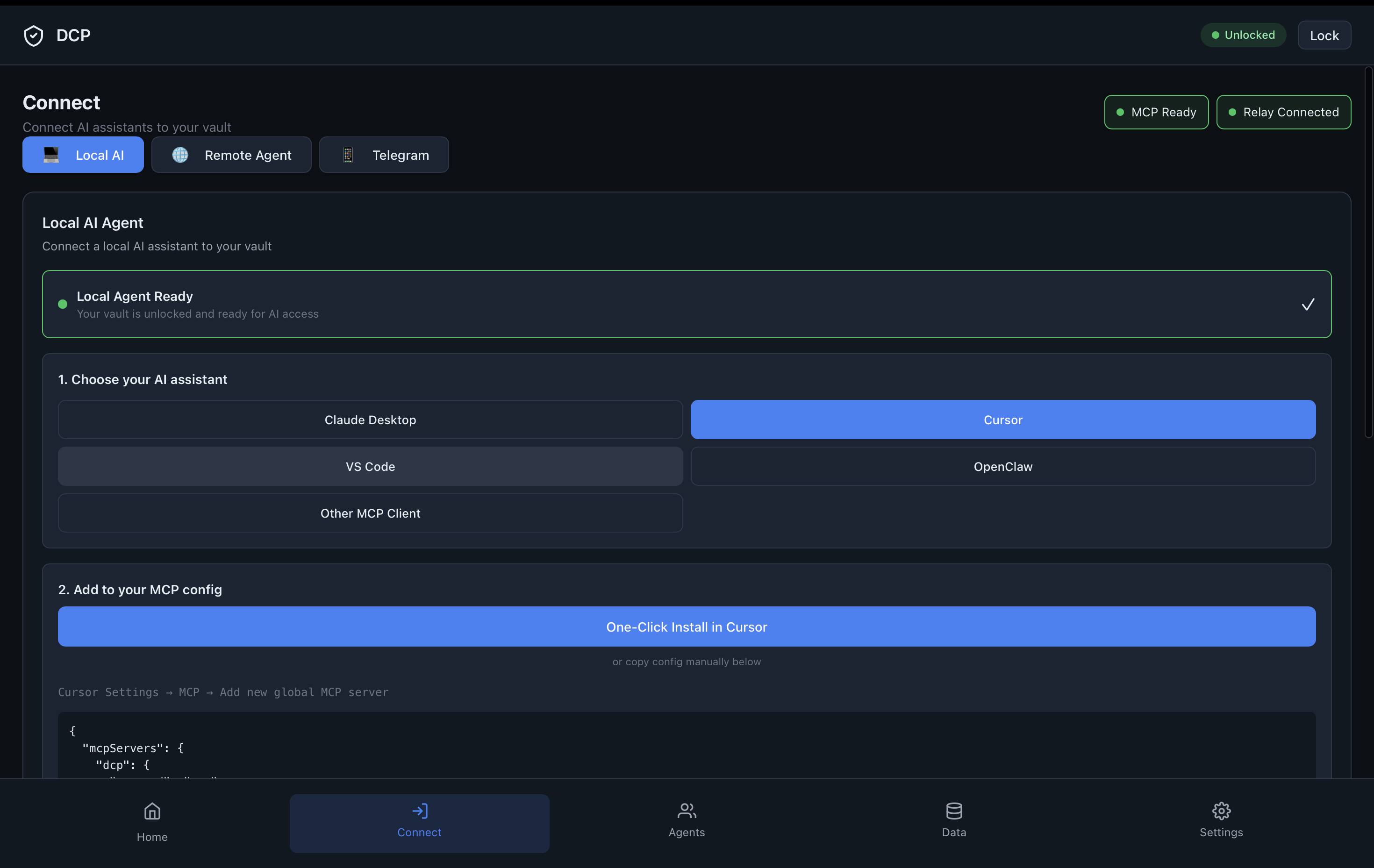
- Open Connect and add Claude Desktop, Cursor, Hermes, or another MCP agent.
- Restart your agent app.
Then ask your agent:
What is my Solana wallet address from DCP?
Remote Agent
For OpenClaw, Hermes, or any agent running on a VPS, create a remote invite in DCP Desktop and run the generated command on the VPS:
curl -fsSL https://dcpagent.com/install.sh | sudo bash -s -- 'dcp_vps_v1_...'
Approve the verification phrase in Desktop. The installer pairs the VPS, starts DCP as a systemd service, and configures OpenClaw or Hermes when either is detected.
Good install output ends with:
DCP service health: ok
Hermes config written: yes
Hermes config verified: yes
For OpenClaw, start a fresh chat/session. For Hermes, run:
/reload-mcp
Cloud Agent (paste a link)
For agents you do not host — Claude.ai, ChatGPT, or hosted OpenClaw/Hermes — there is nothing to install. In DCP Desktop, generate a connect link and paste it into the agent:
dcp_connect_v1_...
The link is single-use, expires in ~10 minutes, and carries no permissions. It pins your vault's public key so the relay cannot impersonate your vault. The agent reaches your on-device vault through the DCP relay (an end-to-end-encrypted MCP facade), and you approve the connection on your device before anything is granted. Scopes, budgets, and revocation stay in your vault.
CLI
Use the CLI to create and manage vault data:
npm install -g @dcprotocol/vault @dcprotocol/agent
dcp init
dcp create-wallet --chain solana
dcp add credentials.api.openai
dcp list
Once a local stdio MCP client is configured, it runs:
{
  "command": "dcp-agent",
  "args": ["run", "--mode", "mcp", "--agent", "claude_desktop"]
}
Try These Prompts
What is my Solana wallet address from DCP?

Read my OpenAI credential from DCP.

Check if sending 0.01 SOL is within my DCP budget.

Request approval to sign a Solana transaction.
How It Works
Claude / Cursor / OpenClaw / Hermes
        |
        v
    dcp-agent
        |
        v
 Local DCP vault
        |
        v
 approve / deny / budget / revoke
        |
        v
 wallets, API keys, identity data
The agent asks for an action. The vault checks policy. If approval is needed, DCP creates a consent request. The agent gets only the result, not the raw private key.
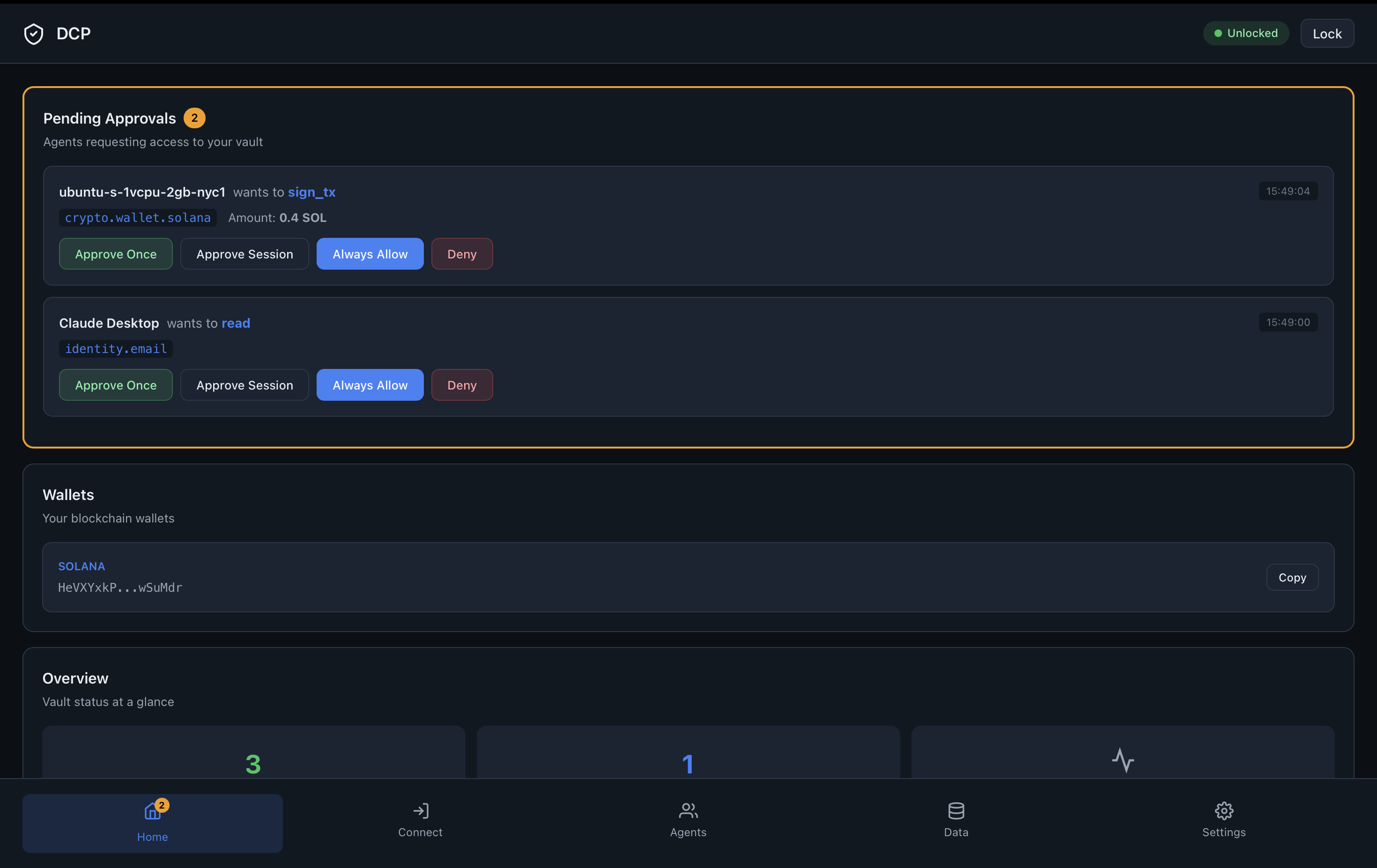
What Approval Shows
When an agent requests a sensitive action, DCP shows:
- which agent is asking
- what action it wants
- amount, chain, and destination for payments
- whether the request is within budget
- approve or deny controls
Screenshots
Real-time approval
MCP connection
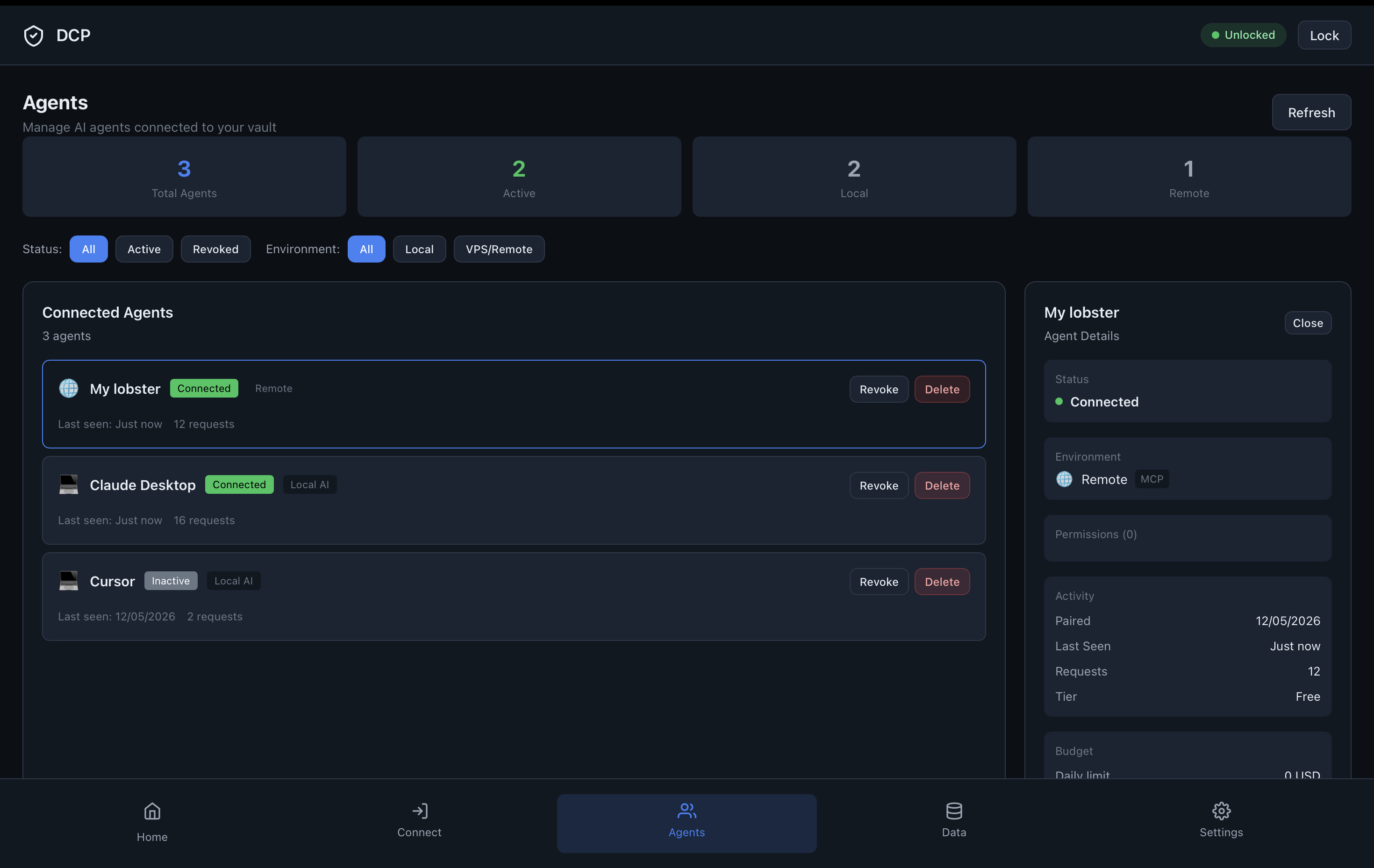
Multiple agents
Security Model
DCP is designed around least privilege.
- private keys never leave the local vault
- agents receive results, not raw private keys
- sensitive actions can require explicit approval
- budgets limit automated spending
- scopes control which data an agent can request
- access can be revoked per agent
- sensitive activity is logged
Supported Today
- Solana transfers and swaps (build, budget-check, approve, sign, submit)
- Solana transaction and message signing
- wallet balances, token search, and transaction history
- scoped vault reads and writes
- API credential storage
- budget checks
- stdio MCP for Claude Desktop, Cursor, Hermes, and similar clients
- HTTP MCP for local or custom agents
- Desktop approvals
- Telegram approvals
- remote/VPS OpenClaw and Hermes agents through relay
MCP Tools Exposed
DCP exposes these MCP tools:
vault_get_addressvault_budget_checkvault_scope_guidevault_sign_txvault_sign_messagevault_sign_x402vault_readvault_write
What Agents Can Request
- wallet address
- transaction signature
- message signature
- API credential access
- identity or profile data
- budget check
What Agents Cannot Do
- read private keys
- bypass approval
- access scopes they were not granted
- spend past configured limits
- silently export the vault
Desktop App
Prefer a GUI? Download DCP Desktop from dcpagent.com.
Desktop Flow
DCP Desktop is the easiest way to get started.
- Download DCP Desktop for macOS, Windows, or Linux.
- Create a vault with a password/passphrase.
- Save your recovery phrase safely.
- DCP creates a Solana wallet for you.
- Add private data or credentials in the Data tab.
- Connect local agents like Claude, Cursor, VS Code, OpenClaw, Hermes, or any MCP client.
- Set permissions per agent.
- Approve, deny, budget, revoke, and audit every action agents ask for.
Remote Agents
For a VPS or remote agent, create an invite in DCP Desktop and run the generated command:
curl -fsSL https://dcpagent.com/install.sh | sudo bash -s -- 'dcp_vps_v1_...'
That one command:
- installs a private DCP Node runtime when the VPS does not already have compatible Node.js
- installs
@dcprotocol/agentunder/var/lib/dcp-agent - creates and starts
dcp-agent.service - pairs the VPS with your Desktop vault through the relay
- starts HTTP MCP on the VPS
- configures OpenClaw and Hermes when either is detected
Host-native Hermes uses ~/.hermes/config.yaml. Docker Hermes uses /opt/data/config.yaml inside the Hermes container and gets a Docker-reachable DCP URL instead of 127.0.0.1.
If Hermes is not detected or automatic config is not verified, run these on the remote host as the Hermes user:
hermes config set mcp_servers.dcp.url http://127.0.0.1:8420/mcp
hermes config set mcp_servers.dcp.enabled true
hermes config set mcp_servers.dcp.tools.prompts false
hermes config set mcp_servers.dcp.tools.resources false
Then run /reload-mcp in Hermes or restart Hermes.
If OpenClaw and Hermes run on the same VPS, they can share the same DCP MCP endpoint. The installer preserves the OpenClaw config shape and only changes the DCP service runtime so systemd runs the installed package directly.
Packages
| Package | Purpose |
|---|---|
@dcprotocol/vault |
Vault CLI and local vault server |
@dcprotocol/agent |
MCP, HTTP MCP, and remote sidecar runtime |
@dcprotocol/core |
Crypto, storage, wallet, policy, and shared types |
@dcprotocol/relay |
Encrypted relay for remote agents |
@dcprotocol/telegram |
Telegram approval service |
@dcprotocol/desktop |
Desktop vault app |
Developer Checks
pnpm install
pnpm -r run typecheck
pnpm -r run test
pnpm -r run build
node scripts/publish-guard.mjs
./scripts/test-security.sh
Similar projects


The trust layer for agent-to-agent commerce — natural-language mandates, ERC-7710 delegated permissions, x402 payments, escrow, and dispute resolution as one open, catch-all Agent Skill / Claude Code plugin.


540 security tests for AI agent systems — MCP, A2A, x402/L402, decision governance, benchmark integrity, skill supply chain. AIUC-1 pre-cert, NIST AI 800-2 aligned, MCP tool-poisoning reproduction. v4.9.1


A wallet for your agents to onboard and pay. Agentic MPP / x402 payments from your machine - CLI + MCP server.


Zero latency! Zero code change! Empower your AI agent with payment ability via x402 protocol! (Openclaw, Claude code, Cursor, Langchain, CrewAI, AutoGen...)


MCP Server for Lightning Faucet - Give your AI agent a Bitcoin wallet


x402 (HTTP 402 Payment Required) SDK + MCP server: let any API charge for itself and any AI agent pay for itself, USDC & stablecoins across EVM, Solana & 8 more chain families, in a couple of lines. Backendless, no fee, self-custodial, paid straight to your wallet. TypeScript, MIT.


More Agent Wallets projects
All Agent Wallets projects →
The AI agent with a wallet — spends USDC autonomously to get real work done. Apache-2.0, TypeScript.


Daydreams is a set of tools for building agents for commerce


A decentralized micro-settlement protocol enabling autonomous AI agents to pay publishers for premium content via Circle Programmable Wallets and x402 nanopayments.


The best way to monetize AI applications & MCP, using x402, CDP Smart Wallets & Paymaster


Command-line wallet and HTTP client for the Tempo blockchain, with built-in Machine Payments Protocol support.


Autonomous AI Agent Swarm framework with x402 self-executing wallets. Empowers LLM-driven agents to trade, bridge, and manage crypto treasuries without human intervention. The ultimate Agentic DeFi toolkit for 2026.
